
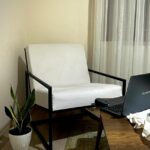





Creating a home workspace that feels both cozy and productive is essential for anyone working remotely or spending significant time at home. A well-designed area can improve focus, reduce stress, and make work more enjoyable. This guide offers practical tips to help you set up a home office that balances comfort and efficiency.
Choose the Right Location
Selecting the best spot in your home for a workspace is the first step. Ideally, it should be:
– Quiet and private: Away from noise and distractions
– Well-lit: Preferably near a window for natural light
– Ample space: Enough room for your desk, chair, and equipment
If space is limited, consider using a corner of a room or a nook that can be dedicated to your work needs.
Invest in Comfortable and Ergonomic Furniture
Comfort is key to staying productive. Spending hours at your desk demands furniture that supports good posture and reduces fatigue.
Desk
– Choose a desk with enough surface area for your computer, paperwork, and other essentials.
– Adjustable desks or standing desks offer flexibility if you want to alternate between sitting and standing.
Chair
– Invest in an ergonomic chair with adjustable height, lumbar support, and comfortable cushioning.
– Avoid using dining chairs or sofas, as they don’t provide enough support for extended work.
Accessories
– Use a keyboard and mouse that reduce strain.
– Consider a footrest if your feet don’t reach the floor comfortably.
Optimize Lighting
Good lighting can reduce eye strain and improve mood.
– Use natural light as much as possible; try positioning your desk near a window.
– Add a desk lamp with adjustable brightness for late work sessions or cloudy days.
– Avoid harsh overhead lights and reduce glare on screens.
Personalize Your Space
Adding personal touches can make your workspace feel inviting.
– Incorporate plants to bring life and fresh air into the room.
– Use artwork, photos, or inspirational quotes that motivate you.
– Choose colors and decor that create a calm environment, such as soft blues, greens, or earth tones.
Organize Efficiently
A tidy workspace helps maintain focus.
– Use shelves, drawers, or filing cabinets to keep supplies and documents organized.
– Keep your desk surface as clear as possible, only keeping daily essentials within reach.
– Utilize cable organizers to manage cords and reduce clutter.
Manage Noise
If your workspace isn’t isolated from household noise, consider ways to minimize distractions.
– Use noise-canceling headphones or earplugs.
– Play soft background music or ambient sounds if they help you concentrate.
– Add rugs, curtains, or soft furnishings to absorb sound.
Create a Routine and Boundaries
Your workspace should signal when it’s time to work and when to relax.
– Set specific working hours to separate work and personal time.
– Keep the workspace reserved for work-related tasks to maintain a clear mental boundary.
– Take regular breaks to move around, stretch, or rest your eyes.
Incorporate Technology Wisely
A smoothly functioning workspace relies on the right tech.
– Invest in a reliable internet connection and quality peripherals.
– Keep software and hardware up to date to avoid frustrating interruptions.
– Use productivity apps or planners to stay organized and on track.
Maintain Cleanliness
Regular cleaning keeps your workspace pleasant and welcoming.
– Dust and wipe surfaces weekly to prevent buildup.
– Declutter regularly to keep only what is necessary.
– Refresh the air by ventilating the area daily.
—
Designing a home workspace that is both cozy and productive requires thoughtful planning and attention to detail. By arranging your environment to support comfort, organization, and focus, you can create a space that helps you do your best work, day after day.



More Stories
Tips for Creating a Productive Home Workspace
Tips for Creating a Cozy and Inviting Home Environment
Tips for Creating a Cozy and Functional Home Office Space